Last reviewed:
Waferstar GSM-KEY user manual
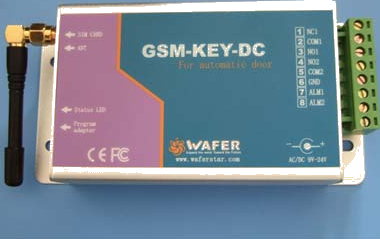
The Waferstar GSM-KEY is a board with a GSM modem that opens an electric gate. When a number on its white list calls, it rejects the call and clicks the relay. The manual says this costs nothing,
Status in the GateOpener app: The app does not support this module yet.
Download the manuals
The manufacturer's PDFs, as published:
- GSM-KEY AC2000 manual, 3.2PDF, English, 1.0 MB
- GSM-KEY-DC DC200 manual, 3.1PDF, English, 0.7 MB
Specifications
| Item | Value and source |
|---|---|
| Default password | 123456 (6 digits) Source: DC200 manual 3.1, pages 4 and 5 |
| Regular user numbers | DC200: 200. AC2000: 2,000 Source: DC200 manual 3.1, page 2; AC2000 manual 3.2, page 2 |
| Time-limited numbers (DC200) | 50 by weekday and time, 50 by date range, 550 by number of uses Source: DC200 manual 3.1, page 2 |
| Alarm numbers | 5 Source: DC200 manual 3.1, page 2 |
| Alarm inputs | 2 Source: DC200 manual 3.1, page 2 |
| Relay terminals | NC1, COM1, NO1 for the gate; NO2, COM2 Source: DC200 manual 3.1, page 2 (text and connector photo) |
| Relay contact rating (AC2000) | 48 V, 0.5 A at most Source: AC2000 manual 3.2, page 3 |
| Gate pulse at the factory | 300 ms Source: DC200 manual 3.1, page 6 |
| Phone numbers | At most 10 digits, no country code Source: DC200 manual 3.1, page 5 |
| Mobile network | GSM; dual-band or quad-band by country Source: DC200 manual 3.1, page 12 |
| Power (AC2000) | 220 V mains Source: AC2000 manual 3.2, page 3 |
The commands below are from the DC200 manual. The AC2000 manual has the same command names, but some of its examples write the slot with other digits (WHL01 instead of WHL001); check yours against its own PDF.
Each command gets a reply SMS: OK when it is correct, Err when it is not (DC200 manual page 4).
SMS commands from the manual
Every command starts with #PWD and the 6-digit password; replace 123456 with yours (DC200 manual pages 4 and 5).
Store phone numbers without the country code, at most 10 digits. If your number is longer, the manual tells you to enter its rightmost 10 digits (DC200 manual page 5).
Change password
Change device password. Must enter new password twice.
#PWD{pwd}#CAP{newpwd}#CAP{newpwd}#PWD123456#CAP333444#CAP333444Add permanent user (WHL)
Add permanent user to whitelist slot (1-200). Max 10 digit phone number, strip country code.
#PWD{pwd}#WHL{slot}={phone}#PWD123456#WHL001=61143815Query permanent user slot
Check which phone is in a permanent slot
#PWD{pwd}#WHL{slot}?#PWD123456#WHL001?Delete permanent user
Remove user from permanent whitelist (or overwrite with new number)
#PWD{pwd}#WHL{slot}=0000000#PWD123456#WHL001=0000000List all permanent users (PC only)
List all numbers in the whitelist. Only works via PC software, not SMS.
#PWD{pwd}#WHL=ALL?#PWD123456#WHL=ALL?Add weekly schedule user (SHL)
Add user with weekly day+time schedule. Days: 1=Mon..7=Sun. 50 slots.
#PWD{pwd}#SHL{slot}={phone}:{days}({startTime}-{endTime})#PWD123456#SHL001=13564121668:1357(8:32-23:59)Add date-range user (PHL)
Add user with access limited to a date range and daily time window. 50 slots. Date format: YYMMDD.
#PWD{pwd}#PHL{slot}={phone}:{startDate}-{endDate}({startTime}-{endTime})#PWD123456#PHL001=13564121668:100324-101012(8:32-18:26)Add count-limited user (QHL)
Add user with limited number of uses. Expires after {count} activations. 550 slots.
#PWD{pwd}#QHL{slot}={phone}:{count}#PWD123456#QHL001=13564121668:12Query special list user (SHL/PHL/QHL)
Check which phone is in a special list slot. Replace {type} with SHL, PHL, or QHL.
#PWD{pwd}#{type}{slot}?#PWD123456#SHL0001?Delete special list user (SHL/PHL/QHL)
Remove user from a special list slot. Replace {type} with SHL, PHL, or QHL.
#PWD{pwd}#{type}{slot}=0000#PWD123456#PHL01=0000List all special users (PC only)
List all numbers in special lists. Only works via PC software.
#PWD{pwd}#SHL=ALL?#PWD123456#SHL=ALL?Set relay delay (gate pulse time)
Set relay pulse duration in MILLISECONDS. Default is 300ms.
#PWD{pwd}#GOT{milliseconds}#PWD123456#GOT500Query relay delay
Check current relay delay setting
#PWD{pwd}#GOT?#PWD123456#GOT?Set relay mode - Momentary pulse
Set relay to momentary pulse mode (click and release). Default mode.
#PWD{pwd}#MODE0#PWD123456#MODE0Set relay mode - Ratchet/toggle
Set relay to ratchet/toggle mode (stays on until next call toggles it off)
#PWD{pwd}#MODE1#PWD123456#MODE1Check signal strength
Query GSM signal quality (0-32). Above 12 is usable, above 16 is good.
#PWD{pwd}#CSQ?#PWD123456#CSQ?Check status
Full device status including alarm config, relay delay, user count, signal, relay state.
#PWD{pwd}#STATUS?#PWD123456#STATUS?Add alarm phone number
Add phone number to receive alarm notifications (max 5 numbers)
#PWD{pwd}#ALARM{slot}={phone}#PWD123456#ALARM01=13818120592Query alarm phone number
Check which phone is in an alarm slot
#PWD{pwd}#ALARM{slot}?#PWD123456#ALARM01?List all alarm numbers
List all alarm notification numbers
#PWD{pwd}#ALARM=ALL?#PWD123456#ALARM=ALL?Configure alarm inputs
Configure alarm input behavior. State: ON/OFF. Mode: SMS or PHONE. Duration: seconds the input must be held to trigger.
#PWD{pwd}#ALARM-IN1={state}:{mode}:{duration},ALARM-IN2={state}:{mode}:{duration}#PWD123456#ALARM-IN1=ON:SMS:2,ALARM-IN2=ON:PHONE:3Set alarm SMS text
Configure custom SMS text sent when alarm inputs are triggered
#PWD{pwd}#UDI1:{text1},UDI2:{text2}#PWD123456#UDI1:XXXXXX, UDI2:XXXXXXSet timer-update phone number
Designate which phone number can update the device clock (required for SHL/PHL time features)
#PWD{pwd}#TIMER-UPDATE:{phone}#PWD123456#TIMER-UPDATE: 96754667Sync device clock
Update the device's internal clock. Must be sent from the designated timer-update phone number.
#PWD{pwd}#CLOCK#PWD123456#CLOCKModules the app supports
The modules the app works with are on the supported hardware page. Their manuals are on the manuals page.